
Monsters vs. Aliens is a hit! $60 Million in the first weekend...
I can't wait to take my girl to see it later this week -and my expectations are pretty darn high.
I've been closely following the development and adoption of 3D filmmaking technologies for the past couple of years.
The newly refined 3D tools, technologies and methodologies available to filmakers allows for a much richer, more elegant 3D movie viewing experience compared to that of even a year or two ago -let alone those dating from the 50's that required wearing those red/blue ("anaglyphic") monstrosities on your face.
There's been a ton of activity on Hollywood around the idea of making movies in 3D. Many of the big blockbuster films shot in the past couple of years were produced with 3D viewing in mind.
In fact, 100% of the films made by Disney and Pixar in the past 18 months have been shot and produced in "3D". However, with only a few hundred theatres nationwide having been upgraded with the new 3D projection technologies, most of these films have been distributed and viewed by audiences in the standard "2D" format.
The problem has been cost.
It can cost between $150,000 to $300,000 to update a single movie theatre screen with the new technologies required to give viewers a quality 3D experience. Most or all of this cost falls on the owner of the theatre - and to them, recovering the cost of this significant cash outlay is a risky proposition.
Will enough people come to see 3D movies?
Will they pay $5 to $8 more for each ticket just to view the film in 3D?
Is this just a "fad" that will pass before the cost has been recovered?
Luckily, the signs are beginning to point to a big fat "YES!!"
Just today, AMC Theatres announced a deal with Sony that will put super high-resolution digital projection systems into all of their 4600 screens across the country. (here's the link - http://www.variety.com/article/VR1118001829.html?categoryid=13&cs=1)
This doesn't mean that all of them will be "3D-capable" but the implication is that a great many of them will be. After all, a majority portion of the cost involved in upgrading a theatre to 3D projection capabilities is the digital projector itself.
I'm adding up the most current data and trends and I'm seeing, finally, a newly energized inertia of both the industry and the movie-going public towards an embrace of 3D film.
Here's some additional tasty reading on the topic:
http://www.digitalcinemareport.com/node/797
http://www.lvrj.com/opinion/42072917.html
http://pro.sony.com/bbsc/ssr/mkt-digitalcinema/?XID=O:4Kon3D08_030109_digcinreport_homepage_3_d145x600swf:3d
http://www.reald.com/
http://www.foxbusiness.com/story/markets/industries/entertainment/dolby-digital-cinema-d-digital-cinema-systems-selected-china-film-group/
http://www.foxbusiness.com/story/markets/industries/entertainment/amc-entertainmentr-reald-announce-d-partnership/
Monday, March 30, 2009


Monday, March 23, 2009
The Story on Storage - SSD vs. hard disc drives
Let's jump straight into this -
A "hard drive" is a data storage device inside of a computer on which the operating system, applications, user files and other data is stored.
ok. good so far?
SSD stands for "Solid State Drive". It's just a hard drive. -A hard drive with no moving parts.
ok. still with me? good.
All previous hard drives over the past 30 or 40 (or so) years have relied on tiny moving parts inside the device. The moving parts include electric motors, spinning magnetic discs (also called platters or spindles) and little moving armatures that are suspended over the spinning discs to read/write the bits of data.
 One could compare the mechanics of these devices to that of old record players (for those of us who can remember what a record player is...) ;)
Ok. So who cares if a hard drive has moving parts or not?
Well, we all should.
The fact is that electronic devices with no moving parts (aka Solid State devices) are more reliable, smaller and often much better performing than the mechanical devices they replace.
The same is (mostly) true about these new SSDs -and the "olde stlye" spinning hard drives that account for the vast majority of hard drives in computers today.
So what do we need to know about SSD's?
Here are a few facts you should know about SSD's right off the bat:
1) SSD's use RAM (Random Access Memory) chips to store data - very much like thumb drives -only faster.
2) SSD's use a standard "SATA" drive connection to connect to the host computer and can be used with any modern workstation or laptop system.
3) Per Megabyte of storage, SSDs can be anywhere from 3X to 15X more expensive than standard drives. However, SSD prices are dropping very quickly while capacity for storage space is rapidly growing.
4) Not all SSD's are created the same. There are available at different price and performance levels. While the high-end SSDs perform better than virtually all other hard drives, lower-end SSD's can give less than stellar performance, depending on the specific computing task.
ok.
So what are the benefits of SSD technology for digital artists?
I'll remind the reader that we are very early in the development and adoption of SSD technology in the computer industry. The relatively high cost and low storage capacity for well-performing SSDs can limit their feasibility and/or desirability for certain specific applications and useage models.
However, here are the types of uses I think SSDs are really good for today - assuming budget is not a concern...
1. Primary/System (OS) Drives for any workstation. A computer that uses high-end SSDs for the operating system and prograns will boot faster, open/close applications faster and give al overall boost in "seat-of-the-pants" feeling of system speed than one using older standard hard drives.
2. User Data/Project storage/"Scratch Discs" - depending on your storage space requirements, using SSDs (either single SSDs or grouped together in a "stripe set" or RAID configuration) can dramatically decrese the time it takes to open/save very large project files or projects.
Additionally, for video editing or VFX work, an SSD-based drive array (two or more SSDs working together as one) can provide the same performance as 3X the number of standard hard drives.
OK.
;)
While there are some great reasons why SSD's may be of use for you, we need to take a look at some of the limitations that may (and for many of you probably should) keep you away from the m for the time being. Here are the caveats:
***CAVEATS***
1) Storage Capacity.
Do keep in mind that the storage capacity for most SSDs (and for all of the really well-performing ones) is much smaller than standard spinning disc-based drives. If you have multiple Terabytes of data that needs to be online at any one time, SSDs are almost certainly NOT going to be cost-effective. Capacity of SSDs today ranges from 32GB to 250GB.
2) Performance.
As I alluded to earlier on the post, SSDs are available in several price/performance categories. According to our own internal lab studies, as well as unbiased reporting from respected sources such as Anandtech.com and TomsHardware.com, the less expensive SSDs currently on the market can provide mixed performance depending on the computing task.
I try to stay brand-agnostic whenever possible but here I do need to make some distinctions that require me to call out some brands and product lines:
The Intel "X25" series SSD drives clearly outperform all other offerings for accross-the-board performance. The outperform all other spinning discs on the market in virtually every type of capability and useage model.
The next "step down" in terms of price and performance are the "Vertex" SSD drives from OCZ Technology. They seem to be less expensive than the Intel X25E, with slightly faster speeds for sutsained sequential reads and writes. Unfortunately, these drives perform quite poorly for other types of genreral storage tasks that involve "random" reads and writes.
What does this mean? Well, It means that these SSDs may make great drives as a "video storage array" for working with large, sequential images such as DPX , TIFF or PNG. But they would almost certianly SLOW DOWN your system if used as a the "primary drive" for your operating system or applications.
At the bottom of the SSD category in terms of price (and not surprisingly, performance) are pretty much any other devices being sold as SSDs by a wide range of vendors. These entry level SSD drives are widely understood to be lacking in mot of the performance areas that matter to digital artist -and my advice is to stay well-clear of any of these.
So to recap this information for our readers: SSDs are cool. SSD's can be put to great use today if their strengths can complement your needs. However, a broader look at these new devices informs most of us can probably do without them for now.
However, looking forward, SSD's are almost certainly the "wave of the future" and are poised to become the de-facto standard technology for hard drives in the years to come.
A "hard drive" is a data storage device inside of a computer on which the operating system, applications, user files and other data is stored.
ok. good so far?
SSD stands for "Solid State Drive". It's just a hard drive. -A hard drive with no moving parts.
ok. still with me? good.
All previous hard drives over the past 30 or 40 (or so) years have relied on tiny moving parts inside the device. The moving parts include electric motors, spinning magnetic discs (also called platters or spindles) and little moving armatures that are suspended over the spinning discs to read/write the bits of data.
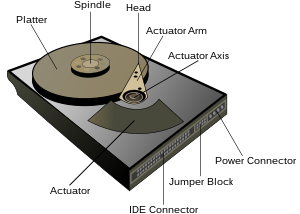 One could compare the mechanics of these devices to that of old record players (for those of us who can remember what a record player is...) ;)
Ok. So who cares if a hard drive has moving parts or not?
Well, we all should.
The fact is that electronic devices with no moving parts (aka Solid State devices) are more reliable, smaller and often much better performing than the mechanical devices they replace.
The same is (mostly) true about these new SSDs -and the "olde stlye" spinning hard drives that account for the vast majority of hard drives in computers today.
So what do we need to know about SSD's?
Here are a few facts you should know about SSD's right off the bat:
1) SSD's use RAM (Random Access Memory) chips to store data - very much like thumb drives -only faster.
2) SSD's use a standard "SATA" drive connection to connect to the host computer and can be used with any modern workstation or laptop system.
3) Per Megabyte of storage, SSDs can be anywhere from 3X to 15X more expensive than standard drives. However, SSD prices are dropping very quickly while capacity for storage space is rapidly growing.
4) Not all SSD's are created the same. There are available at different price and performance levels. While the high-end SSDs perform better than virtually all other hard drives, lower-end SSD's can give less than stellar performance, depending on the specific computing task.
ok.
So what are the benefits of SSD technology for digital artists?
I'll remind the reader that we are very early in the development and adoption of SSD technology in the computer industry. The relatively high cost and low storage capacity for well-performing SSDs can limit their feasibility and/or desirability for certain specific applications and useage models.
However, here are the types of uses I think SSDs are really good for today - assuming budget is not a concern...
1. Primary/System (OS) Drives for any workstation. A computer that uses high-end SSDs for the operating system and prograns will boot faster, open/close applications faster and give al overall boost in "seat-of-the-pants" feeling of system speed than one using older standard hard drives.
2. User Data/Project storage/"Scratch Discs" - depending on your storage space requirements, using SSDs (either single SSDs or grouped together in a "stripe set" or RAID configuration) can dramatically decrese the time it takes to open/save very large project files or projects.
Additionally, for video editing or VFX work, an SSD-based drive array (two or more SSDs working together as one) can provide the same performance as 3X the number of standard hard drives.
OK.
;)
While there are some great reasons why SSD's may be of use for you, we need to take a look at some of the limitations that may (and for many of you probably should) keep you away from the m for the time being. Here are the caveats:
***CAVEATS***
1) Storage Capacity.
Do keep in mind that the storage capacity for most SSDs (and for all of the really well-performing ones) is much smaller than standard spinning disc-based drives. If you have multiple Terabytes of data that needs to be online at any one time, SSDs are almost certainly NOT going to be cost-effective. Capacity of SSDs today ranges from 32GB to 250GB.
2) Performance.
As I alluded to earlier on the post, SSDs are available in several price/performance categories. According to our own internal lab studies, as well as unbiased reporting from respected sources such as Anandtech.com and TomsHardware.com, the less expensive SSDs currently on the market can provide mixed performance depending on the computing task.
I try to stay brand-agnostic whenever possible but here I do need to make some distinctions that require me to call out some brands and product lines:
The Intel "X25" series SSD drives clearly outperform all other offerings for accross-the-board performance. The outperform all other spinning discs on the market in virtually every type of capability and useage model.
The next "step down" in terms of price and performance are the "Vertex" SSD drives from OCZ Technology. They seem to be less expensive than the Intel X25E, with slightly faster speeds for sutsained sequential reads and writes. Unfortunately, these drives perform quite poorly for other types of genreral storage tasks that involve "random" reads and writes.
What does this mean? Well, It means that these SSDs may make great drives as a "video storage array" for working with large, sequential images such as DPX , TIFF or PNG. But they would almost certianly SLOW DOWN your system if used as a the "primary drive" for your operating system or applications.
At the bottom of the SSD category in terms of price (and not surprisingly, performance) are pretty much any other devices being sold as SSDs by a wide range of vendors. These entry level SSD drives are widely understood to be lacking in mot of the performance areas that matter to digital artist -and my advice is to stay well-clear of any of these.
So to recap this information for our readers: SSDs are cool. SSD's can be put to great use today if their strengths can complement your needs. However, a broader look at these new devices informs most of us can probably do without them for now.
However, looking forward, SSD's are almost certainly the "wave of the future" and are poised to become the de-facto standard technology for hard drives in the years to come.
Monday, March 16, 2009
what happens now that the megapixel wars are over?
I just read an interesting article on NewScientist.com that takes a look at the future of digital imaging now that the battle for more megapixels in cameras is essentially over...
Besides camera manufacturers now giving much more attention to low-light performance and image color accuracy, there are some interesting software image processing techniques (some of which have been around for a few years in the high-end VFX industry) that are making their way into the consumer market.
check it out over at: http://www.newscientist.com/article/dn16770-innovation-what-next-after-the-megapixel-wars.html?DCMP=OTC-rss&nsref=online-news
Besides camera manufacturers now giving much more attention to low-light performance and image color accuracy, there are some interesting software image processing techniques (some of which have been around for a few years in the high-end VFX industry) that are making their way into the consumer market.
check it out over at: http://www.newscientist.com/article/dn16770-innovation-what-next-after-the-megapixel-wars.html?DCMP=OTC-rss&nsref=online-news
Sunday, March 15, 2009
Intel Nehalem - just the facts ma'am
In case you have just awakened from a deep coma, I'm guessing you have by now heard some noise about Intel's new processor microarchitecture - "Nehalem".

There has been a little bit of confusion about these new CPUs so I wanted to put up some facts:
OK. Now that we've got that straight, let's get a little more specific about what these new processors mean for digital artists and content creation in general.
For most digital artists, Nehalem-based systems can be expected to allow their software apps and utilities to perform between 20% to 80% faster than they would on "old" intel Core 2 and Xeon 5400 equivalent CPUs. By "equivalent" I mean to to say - running at the same "clock speed" (which indicates the basic speed of the CPUs internal circuitry).
In contrast to most "consumer" software applications such as gaming and office productivity, programs used for 3D design, image rendering and other content creation-related tasks are typically "CPU intensive". This means that their performance is limited by the capability (processing speed and capacity) of the host computer's CPU.
These applications can also be "memory intensive" -meaning that their performance can be limited by the capacity (the speed and/or the amount) of RAM in the host computer.
With this being the case, digital artists will benefit enormously from the new capabilities and features of the Nehalem-based CPUs.
The most important features to understand are these:
Feature: Hyperthreading
This is a standard feature on most of the new i7 and Xeon processors. Hyperthreading allows the CPU's 4 cores to each process two streams of simultaneous computing tasks. Consequently, a quadcore CPU will present itself to your operating system and applications as having 8 available cores.
Benefit:
While the extra "virtual" cores made available through Hyperthreading won't come anywhere close to doubling the speed of your system, they do provide between 20% to 40% additional performance for highly "threaded" processes. This can greatly reduce the time required for 3D raytraced rendering, transcoding, etc. Likewise, multitasking and background processing can be maintained with very little impact on interactivity for the user.
Feature: "On-die" Memory Controllers
Compared to earlier Intel processors, the new Nehalem microarchitecture employs a radically redesigned approach to controlling the shuffling of data between the CPU and the system's RAM. Instead of residing on the motherboard, the memory controller circuitry is now inside the CPU. Without getting too technical, this simply allows for a much more efficient (faster) flow of data to and from the CPU's processing cores and data caches. Memory bandwidth for Nehalem chips is up to 350% higher compared to earlier designs.
Benefit:
Improved memory bandwidth won't do much for 3D rendering speed or most other "CPU-bound" operations. However, for "memory-bound" tasks such as 2D compositing, fluid simulation and video encoding, users will see a marked jump in interactivity and processing speed. Performance improvements for this type of computing will be anywhere from 30% up to well over 100% over the previous Intel CPUs.
There are several other new features in the Nehalem generation of CPUs that can and will positively impact the "user experience" for artists working with high-end design applications.
I consider these as secondary compared to the ones I highlighted above, but I'll briefly list them here.
QPI - Quick Path Interconnect
This is a new high-speed "data bus" that connects the CPUs and other primary motherboard components to the "outside world" via the external ports and add-in cards. These include USB, firewire, audio, Ethernet, GPU (graphics), etc.
Turbo Mode -
This is a feature on most Nehaem CPUs (but is not available on the entry-level) that allows the cpu's cores to automatically run at slightly higher speeds. This isn't likely to be something that you will necessarily notice as a user, but it can provide a slight extra "bump" in performance when you need it.
So...
The long and short of all this is: Nehalem = more flexibility for digital artists.
The extra speed gains in the new line of Intel Nehalem CPUs will translate to better performance working with most digital content design applications and suites from Autodesk and Adobe, etc. Artists will enjoy an immediate boost in productivity which will allow for more "ideation", experimentation and creative flexibility. This will, in turn, allow artists to produce higher quality work -or at least get more work completed in the same amount of time...
oh, and all your games run really well on these new machines too.
;)

There has been a little bit of confusion about these new CPUs so I wanted to put up some facts:
- "Nehalem" is Intel's internal codename for the latest "microarchtecture" on which all of it's new CPUs are based. Intel's codenames for their products while underdevelopment typically are forgotten and supplanted with the retail product names given them by Intel after they are released to the market. But "Nahalem" seems to be sticking around as the popular streetname for Intel's new family of chips. This is causing a little confusion...
- Core i7 is Intel's official product name for the "desktop" variant of Nehalem. All Core i7 systems are "single socket" computers that have only one CPU. The Core i7 product line is aimed squarely at consumer PCs and "entry level" graphics workstations. Core i7 replaces the "Core 2" (including "Duo" and "Quad" and "Extreme") product line. Its Intel codename designation is (was?) "Bloomfield". Core I7 CPUs come in several different speeds and all are "quadcore" parts.
- As in years-past, Intel Xeon continues as the company's official product name for their workstation and server-oriented CPUs. Xeon is sold both as the single-socket Xeon 3500 series (also codenamed "Bloomfield" - same as Core i7) as well as dual-socket Xeon 5500 platform (codename "Gainstown"). These CPUs replace the previous generation (Xeon 3300 and Xeon 5400 product lines) and are the newest high-end offerings based on Intel's Nehalem technology. Sold at different speed "bins", Xeon CPUs are sold as quadcore processors*. (*there is a dual-core variant but it will not likely be used for graphics workstations)
- The new CPUs are priced about the same as the CPUs they are replacing.
- Core i7 systems are available pretty much everywhere. On April 1st, many PC manufacturers will begin shipping new workstations based in the new Xeon 5500 series CPUs. (Apple began shipping Nahelem-based workstations in March.)
OK. Now that we've got that straight, let's get a little more specific about what these new processors mean for digital artists and content creation in general.
For most digital artists, Nehalem-based systems can be expected to allow their software apps and utilities to perform between 20% to 80% faster than they would on "old" intel Core 2 and Xeon 5400 equivalent CPUs. By "equivalent" I mean to to say - running at the same "clock speed" (which indicates the basic speed of the CPUs internal circuitry).
In contrast to most "consumer" software applications such as gaming and office productivity, programs used for 3D design, image rendering and other content creation-related tasks are typically "CPU intensive". This means that their performance is limited by the capability (processing speed and capacity) of the host computer's CPU.
These applications can also be "memory intensive" -meaning that their performance can be limited by the capacity (the speed and/or the amount) of RAM in the host computer.
With this being the case, digital artists will benefit enormously from the new capabilities and features of the Nehalem-based CPUs.
The most important features to understand are these:
Feature: Hyperthreading
This is a standard feature on most of the new i7 and Xeon processors. Hyperthreading allows the CPU's 4 cores to each process two streams of simultaneous computing tasks. Consequently, a quadcore CPU will present itself to your operating system and applications as having 8 available cores.
Benefit:
While the extra "virtual" cores made available through Hyperthreading won't come anywhere close to doubling the speed of your system, they do provide between 20% to 40% additional performance for highly "threaded" processes. This can greatly reduce the time required for 3D raytraced rendering, transcoding, etc. Likewise, multitasking and background processing can be maintained with very little impact on interactivity for the user.
Feature: "On-die" Memory Controllers
Compared to earlier Intel processors, the new Nehalem microarchitecture employs a radically redesigned approach to controlling the shuffling of data between the CPU and the system's RAM. Instead of residing on the motherboard, the memory controller circuitry is now inside the CPU. Without getting too technical, this simply allows for a much more efficient (faster) flow of data to and from the CPU's processing cores and data caches. Memory bandwidth for Nehalem chips is up to 350% higher compared to earlier designs.
Benefit:
Improved memory bandwidth won't do much for 3D rendering speed or most other "CPU-bound" operations. However, for "memory-bound" tasks such as 2D compositing, fluid simulation and video encoding, users will see a marked jump in interactivity and processing speed. Performance improvements for this type of computing will be anywhere from 30% up to well over 100% over the previous Intel CPUs.
There are several other new features in the Nehalem generation of CPUs that can and will positively impact the "user experience" for artists working with high-end design applications.
I consider these as secondary compared to the ones I highlighted above, but I'll briefly list them here.
QPI - Quick Path Interconnect
This is a new high-speed "data bus" that connects the CPUs and other primary motherboard components to the "outside world" via the external ports and add-in cards. These include USB, firewire, audio, Ethernet, GPU (graphics), etc.
Turbo Mode -
This is a feature on most Nehaem CPUs (but is not available on the entry-level) that allows the cpu's cores to automatically run at slightly higher speeds. This isn't likely to be something that you will necessarily notice as a user, but it can provide a slight extra "bump" in performance when you need it.
So...
The long and short of all this is: Nehalem = more flexibility for digital artists.
The extra speed gains in the new line of Intel Nehalem CPUs will translate to better performance working with most digital content design applications and suites from Autodesk and Adobe, etc. Artists will enjoy an immediate boost in productivity which will allow for more "ideation", experimentation and creative flexibility. This will, in turn, allow artists to produce higher quality work -or at least get more work completed in the same amount of time...
oh, and all your games run really well on these new machines too.
;)
Saturday, February 14, 2009
redBOXX II - what's it good for?
By now, most people "in the know" have heard of the RED ONE 4K Digital Cinema camera system. It is revolutionizing and "democratizing" the technology of digital filmmaking and delivering ultra-high resolution (4K) cinematography capabilities into the hands of anybody with about $40K and a dream...
For the uninitiated, deciphering the available options for RED ONE post workflows can be mind-numbingly complicated and confusing.
Well, here is some good news :
It's official - redBOXX II is officially released!

Anybody who's been working in the RED post universe for the past year or so probably has heard of redBOXX at one point or another. Those only now joining the frey may be hearing about this new platform for the first time.
So what's the buzz about redBOXX II ? And how exactly can it be used to improve the efficiency and production quality for RED-based workflows ?
Well, in simple terms, redBOXX II is a technology platform for viewing, processing and finishing RED ONE camera clips (r3d files). redBOXX II comes pre-configured with Scratch Cine (or Scratch "finishing") software - the undisputed "killer app" for processing, color grading and finishing RED footage.
redBOXX II (running the Scratch software) can provide realtime "decode and playout" of 4K RED ONE camera clips via HD-SDI @ 10bit RGB 4:4:4 image quality. It can do so for almost all 4K camera modes at "1/2-high" quality settings at up to and including 30fps (29.97fps).
For dailies and critical viewing, the redBOXX II can play back 4K camera footage to a calibrated grading monitor or digital projection system at up to 2K resolution. This allows DPs and Directors to make sure they got their shots -complete with a primary or "best light" color correction pass.
The redBOXX can take an EDL or XML "cut list" from popular editing applications such as Final Cut Pro and Avid Media Composer and provide frame-accurate, realtime layoff to all popular VTR formats including 10-bit formats such as HDCAM SR and D5 via dual-link HD-SDI .
This is ideal for quick turn-around of tape-based deliverables such as dailies, cutting copies or even high-quality masters and archival copies.
In addition to realtime HD-SDI output, the redBOXX II provides the worlds fastest transcoding performance that allows RED camewra data (3rd files) to be converted into other more post-friendly standard file formats such as DPX, TIFF or Quicktime. Included in these options are popular CODECs such as Avid's DNxHD and Panasonic's DVC Pro HD.
8channel AES-EBU audio outputs are standard equipment on the redBOXX II. This provides a capability to decode and playback the high-quality audio streams sometimes embedded into r3d camera footage. This audio is "sync-locked" to the SDI output and provides realtime, mutli-channel digital audio playout capabilities out of the box.
Other standard features such as eSATA, Firewire 800 and 8Gbps Fibre Channel (optional) allow redBOXX to be integrated into virtually any post or editorial environment. Additionally, there are planety of cross-platform workflows that have been developed to optimize the efficiency of MAC-Windows hybrid pipelines making use of redBOXX and Scratch Cine software capabilities.
In short, if you have a requirement to provide your client with quickest turnaround on RED-based projects while ensuring your maxiumum production (image) quality and flexibility - there is NO SUBSTITUTE for redBOXX II.
For the uninitiated, deciphering the available options for RED ONE post workflows can be mind-numbingly complicated and confusing.
Well, here is some good news :
It's official - redBOXX II is officially released!

Anybody who's been working in the RED post universe for the past year or so probably has heard of redBOXX at one point or another. Those only now joining the frey may be hearing about this new platform for the first time.
So what's the buzz about redBOXX II ? And how exactly can it be used to improve the efficiency and production quality for RED-based workflows ?
Well, in simple terms, redBOXX II is a technology platform for viewing, processing and finishing RED ONE camera clips (r3d files). redBOXX II comes pre-configured with Scratch Cine (or Scratch "finishing") software - the undisputed "killer app" for processing, color grading and finishing RED footage.
redBOXX II (running the Scratch software) can provide realtime "decode and playout" of 4K RED ONE camera clips via HD-SDI @ 10bit RGB 4:4:4 image quality. It can do so for almost all 4K camera modes at "1/2-high" quality settings at up to and including 30fps (29.97fps).
For dailies and critical viewing, the redBOXX II can play back 4K camera footage to a calibrated grading monitor or digital projection system at up to 2K resolution. This allows DPs and Directors to make sure they got their shots -complete with a primary or "best light" color correction pass.
The redBOXX can take an EDL or XML "cut list" from popular editing applications such as Final Cut Pro and Avid Media Composer and provide frame-accurate, realtime layoff to all popular VTR formats including 10-bit formats such as HDCAM SR and D5 via dual-link HD-SDI .
This is ideal for quick turn-around of tape-based deliverables such as dailies, cutting copies or even high-quality masters and archival copies.
In addition to realtime HD-SDI output, the redBOXX II provides the worlds fastest transcoding performance that allows RED camewra data (3rd files) to be converted into other more post-friendly standard file formats such as DPX, TIFF or Quicktime. Included in these options are popular CODECs such as Avid's DNxHD and Panasonic's DVC Pro HD.
8channel AES-EBU audio outputs are standard equipment on the redBOXX II. This provides a capability to decode and playback the high-quality audio streams sometimes embedded into r3d camera footage. This audio is "sync-locked" to the SDI output and provides realtime, mutli-channel digital audio playout capabilities out of the box.
Other standard features such as eSATA, Firewire 800 and 8Gbps Fibre Channel (optional) allow redBOXX to be integrated into virtually any post or editorial environment. Additionally, there are planety of cross-platform workflows that have been developed to optimize the efficiency of MAC-Windows hybrid pipelines making use of redBOXX and Scratch Cine software capabilities.
In short, if you have a requirement to provide your client with quickest turnaround on RED-based projects while ensuring your maxiumum production (image) quality and flexibility - there is NO SUBSTITUTE for redBOXX II.
Tuesday, February 3, 2009
The economy stinks. so work smarter.
In these challenging times, many digital design studio managers are asking themselves (and their artists) "how can we be more efficient & competitive ?"
This is "The Big Question" being pondered as companies of all sizes are feeling the pinch caused by the global economic downturn.
BOXXlabs is often asked to advise our customers in the area of workflow and resource optimization -and we have some tried and true suggestions for "best practices" that can extend your company's capabilities and help make the most of what you've got:
But there are also many things that each of us have some control over.
Now go forth and make art!
- Use the right tools for the job. Investing in quality software with the specific features you need for the type of work you do most often is a great way to allow talent to shine and to get more work through the pipeline.
- Learn and make use of efficient scene construction. There are almost always more than one way to get the aesthetic effect you are going for in your software apps. But it's easy to get "sloppy" (even without realizing it) and to construct your 3D scenes or 2D comps in ways that are perhaps quicker to setup - but which are going to take longer to render -or otherwise bog down the system unnecessarily. This is especially common for artists who taught themselves the application(s) they use. My advice is to get yourself a well-reviewed book for your chosen app- or at least go over the manufacturer's tutorials again and make sure you are using the recommended workfows and design approaches. And if you are managing a team of artists -insist on having your people pay attention to this.
- Learn the tricks, shortcuts and "cheats" in your applications and use them like the "power-users" do. Reading books & online forums -and taking some inexpensive online courses are great ways to learn about these.
- For 3D artists - LEARN TO USE A COMPOSOSITING APPLICATION. I can't count the number of accomplished 3D artists who have told me they will NEVER go back to rendering out everything in a single pass. Indeed, rendering out your 3D scene elements in multiple "passes" or "layers" and then compositing them together in tools such as After Effects, fusion or combustion is one of the very best ways to bring speed and flexibility to your work.
- Finally, there's nothing like screaming-fast hardware for speeding up your work and allowing you to deliver new, higher levels of quality to your clients. If believe there is value in using proven, professional tools for your chosen trade, then making an investment in new workstations or dedicated rendernodes is a no-brainer!
But there are also many things that each of us have some control over.
Now go forth and make art!
Monday, January 19, 2009
this thing rocks!
Some of you may not have heard, but BOXX just released a new workstation this week.
Now, I usually try to stay fairly informational and unbiased around here. And the following statement is not an exaggeration or simple marketing hype:
The 3DBOXX 4850 Extreme is the fastest uni-processor graphics workstation ever designed.
It's true. Over the past few months of internal product design and engineering here at BOXX, our teams began to see a trend from the earliest stages... In test after test, we saw system performance of this new workstation platform rivaling the fastest graphics workstations on the market. This included workstations from all major competitors at every price and configuration!
BOXXlabs uses a number of industry-standard applications and benchmark suites to evaluate and "tweak" the performance of all BOXX workstations and rendernodes.
Our tests look at a number of areas of system performance and capabilities including raw numerical processing speed, memory performance, hard drive & storage performance, thermal and acoustic footprints, etc
In our testing of the new 3DBOXX 4850 Extreme, we determined the following technical and market-related characteristics :
3DBOXX 4850 Extreme provides:
-unrivaled single-threaded performance
-unrivaled multithreaded performance for a single CPU system
-unrivaled performance for compositing applications including combustion, AE CS4 & Fusion
-unrivaled price-performance compared to any major competitor including Apple, HP & DELL
This machine simply rocks.
That is all.
Now, I usually try to stay fairly informational and unbiased around here. And the following statement is not an exaggeration or simple marketing hype:
The 3DBOXX 4850 Extreme is the fastest uni-processor graphics workstation ever designed.
It's true. Over the past few months of internal product design and engineering here at BOXX, our teams began to see a trend from the earliest stages... In test after test, we saw system performance of this new workstation platform rivaling the fastest graphics workstations on the market. This included workstations from all major competitors at every price and configuration!
BOXXlabs uses a number of industry-standard applications and benchmark suites to evaluate and "tweak" the performance of all BOXX workstations and rendernodes.
Our tests look at a number of areas of system performance and capabilities including raw numerical processing speed, memory performance, hard drive & storage performance, thermal and acoustic footprints, etc
In our testing of the new 3DBOXX 4850 Extreme, we determined the following technical and market-related characteristics :
3DBOXX 4850 Extreme provides:
-unrivaled single-threaded performance
-unrivaled multithreaded performance for a single CPU system
-unrivaled performance for compositing applications including combustion, AE CS4 & Fusion
-unrivaled price-performance compared to any major competitor including Apple, HP & DELL
This machine simply rocks.
That is all.
greetings CG pros and enthusiasts alike!
**UPDATE 2010**
As of October 2009 I am not working at BOXX, and will no longer be updating this blog.
I've started my own company and can now be reached
through the following sites :
adamglick.net
http://www.linkedin.com/in/adamglick3000
Welcome to the first installment of BOXXtalk - the official BOXXlabs blog and tech news review.
BOXXtalk is a forum for the sharing and discussion of trends, workflows and emerging technologoes in the CG, VFX and digital content creation universe.
My name is Adam Glick, chief technologist here at BOXXlabs -and your host here at BOXXtalk.
Here we will discuss the very latest in the exciting and ever-changing world of computer graphics technologies for the creative professional.
As of October 2009 I am not working at BOXX, and will no longer be updating this blog.
I've started my own company and can now be reached
through the following sites :
adamglick.net
http://www.linkedin.com/in/adamglick3000
Welcome to the first installment of BOXXtalk - the official BOXXlabs blog and tech news review.
BOXXtalk is a forum for the sharing and discussion of trends, workflows and emerging technologoes in the CG, VFX and digital content creation universe.
My name is Adam Glick, chief technologist here at BOXXlabs -and your host here at BOXXtalk.
Here we will discuss the very latest in the exciting and ever-changing world of computer graphics technologies for the creative professional.
Subscribe to:
Posts (Atom)




 Posts
Posts


